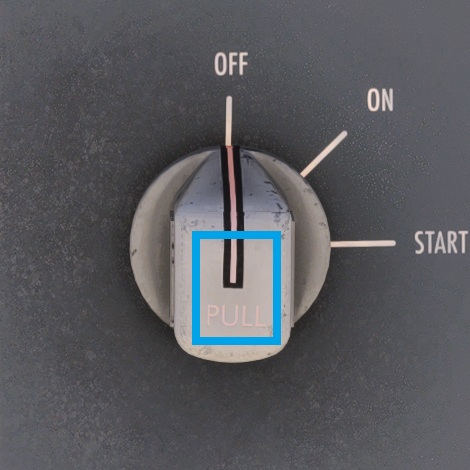
The APU start selector is located on the lower right section of the Overhead panel. To start the APU, you must first set the APU start selection to the ON position, then PULL the selector out over the baulk before rotating it to the START position to initiate the start sequence. The selector is spring-loaded from START to ON.
IMPORTANT! Just like the real aircraft, a baulk has been simulated to prevent accidental APU starts. The APU start selector must be raised over the baulk in order to move the switch from ON to START.
Similarly, the IRS selectors on the IRS MODE SELECT panel have a baulk simulated to prevent accidental movement of the selectors from ALIGN to NAV, and NAV to ALIGN. To align the IRSs, you must move the IRS selectors from OFF to ALIGN, then PULL the selector out over the baulk before rotating it to the NAV position.
For users of the LEGACY Cockpit Interaction System, there is a clickspot in the centre of the APU start selector and IRS selectors to PULL them out over the baulk. This clickspot is highlighted by a blue square in the screenshot below.
For users of the LOCK Cockpit Interaction System, the selectors can be pulled out either by right-clicking the selector (mouse) or by LOCKING onto the selector and moving the right thumbstick UP (PS5/Xbox controller).