
A Digital Music Player is fitted on the forward wall of the forward galley and provides a means to play music or announcements in the cabin throughout the flight.
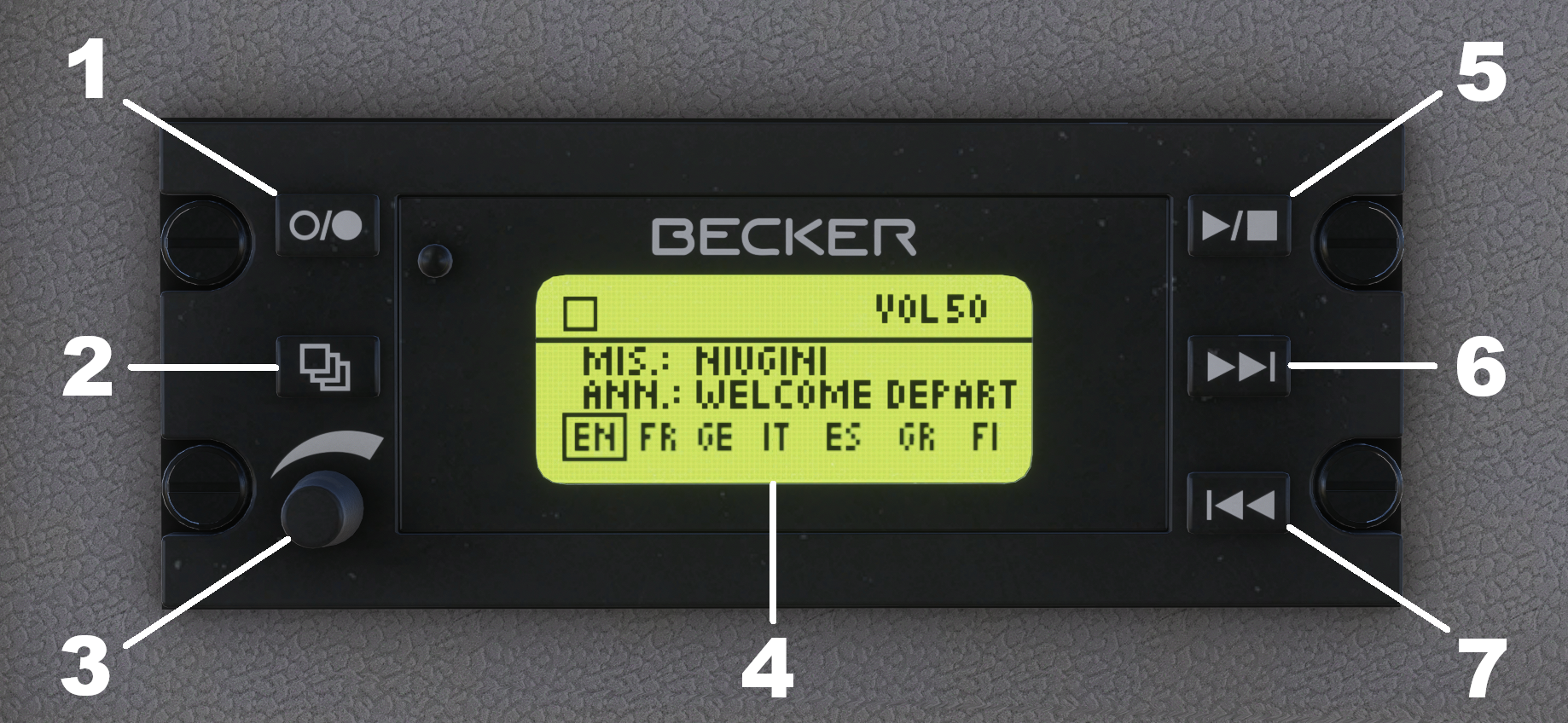
- ON/OFF button
- Momentary press – Repeat/Shuffle button
Press and hold – Music/Announcement mode toggle button - Volume knob / Mute button
- Display
- Play/Stop button
- Skip Right button
- Skip Left button
The Digital Music Player can select and play up to seven different music tracks or announcements. It works much like a typical music player that you might find in your home or car, with Skip Left/Right buttons that are used to select the desired music track or announcement, a Play/Pause button to play/pause the track and a volume knob which controls the volume when twisted or mutes the track when pushed in.
The volume of the music/announcements in the cockpit will vary depending on the cockpit door position. If the cockpit door is open, the music/announcements will be heard clearly in the cockpit, but with the cockpit door closed, the volume of the music/announcements will be significantly quieter.
In the real aircraft, the aircraft operator would decide which mode they want the Digital Music Player to function in (Announcement or Music), and insert an SD card with the required software. However, in this simulation, pressing and holding the MODE button on the digital music player (labelled 2 above) will toggle between the two modes.